
So far, we have learned how to store information to help the computer follow program instructions. We looked at how you can help the computer figure out what instructions to follow with conditions. Loops helped in running certain instructions repeatedly to make the computer wait or process many different variables.
But sometimes we want the computer to follow a whole set of instructions multiple times. It could get tedious having to type them over and over again though, and it makes the programming code look long and redundant. To help solve this problem, just as we stored information in variables, we can store instructions in methods . Methods , or functions, contain a set of instructions that can be run or called at any point in a program by typing its name.
They can be simple …
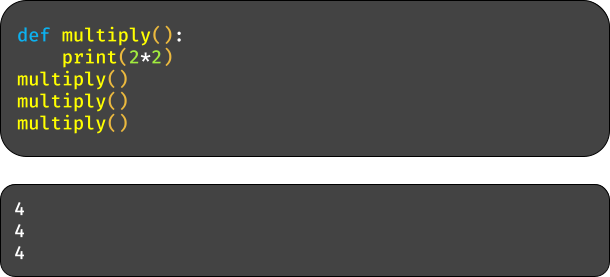
…or complex.
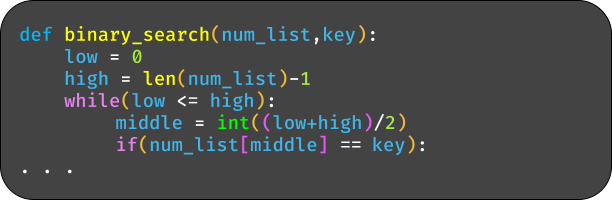
Let ’s look at an example of where functions become useful.
In the Pokemon games, you often find yourself engaging in battle with other wild or trained Pokemon.
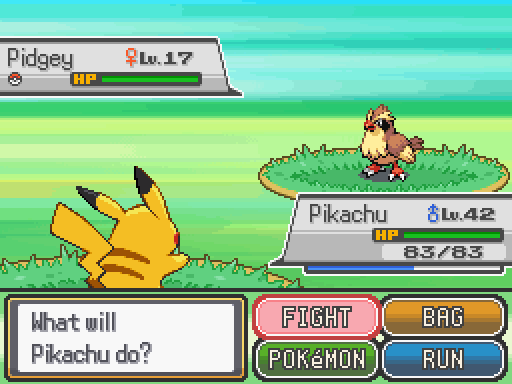
You have several options for what you can do, like “ Fight ”or “ Run .”If you choose to fight, you pick an attack to use, watch an animation play showing the damage dealt to the opponent, their health bar is depleted, and many more events are triggered. For the computer to follow all the instructions to make each of these events occur, there are tens or hundreds of lines of code that have to be processed. Imagine if these lines of code, along with all the code for each of the other functions like “Run ”, were all present in one section of the program. It would look long and messy and be tedious to troubleshoot if there are bugs.
There might also be a variety of environments to fight in like gyms.
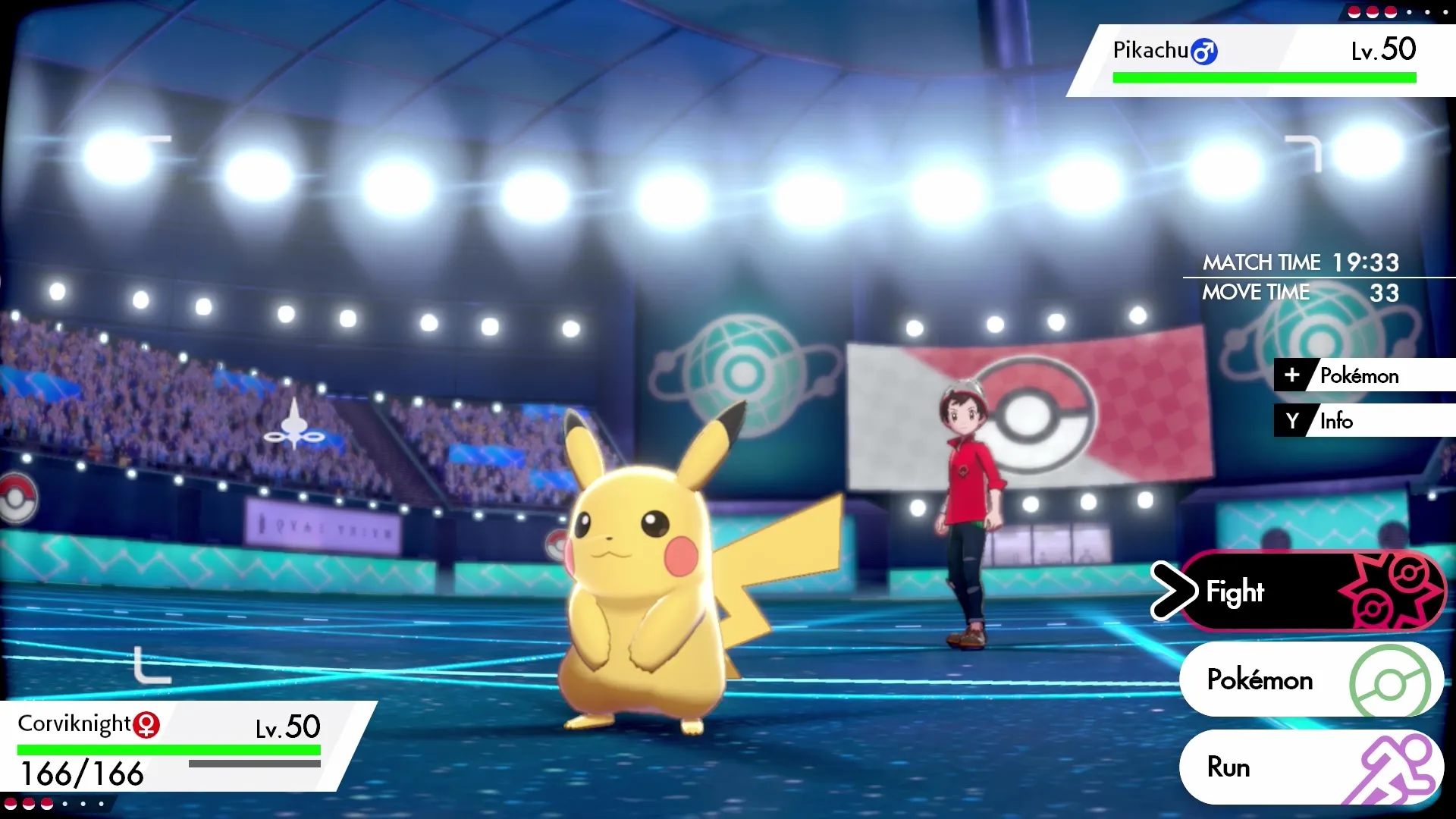
What if you had to copy and paste the programming code from fighting in the wild to fighting in gyms and all other environments? Again, it can be tedious, and would just be redundant. Methods help solve all these problems by storing these lines of code and have them be called by just typing its name.

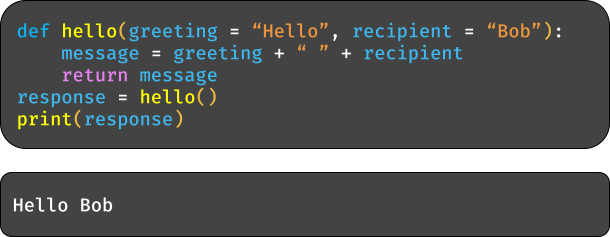
You may have already noticed the examples of how to write methods. It is similar to defining a variable except you just put the “ def ”keyword before the method name and a pair of parentheses afterward. Make sure to indent the lines of code you want in the method definition like with loops. To use it, you type its name with parentheses.
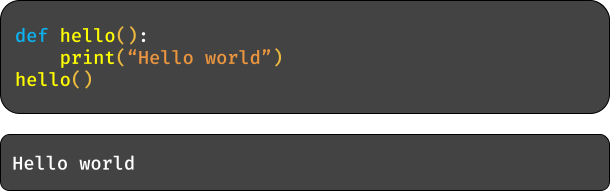
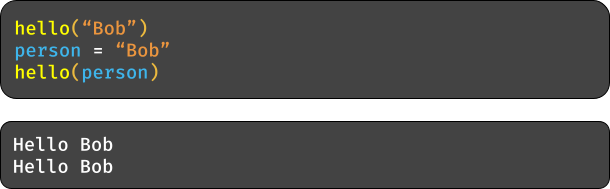
The parentheses are not just there for show though. When using the code in the method, the context or program you want to use it in could require different information to be given to it. You may then provide the function with information inside the parentheses as variables and write where in the function you want them to be used by referencing them by the same name.

To provide the variable with a value, you type the value in the parentheses when calling the method or type in a variable that has the value stored.
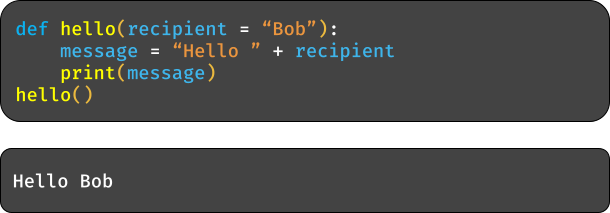
The method input variable can have a default or placeholder value given to it if no value is given when calling it.
One last note is that the method can return or output a response after finishing running the instructions. You type the “return ”keyword where you want the method to stop, followed by the information or variable you want it to send.

- When you choose to fight in Pokemon, you are given a selection of moves to pick from.
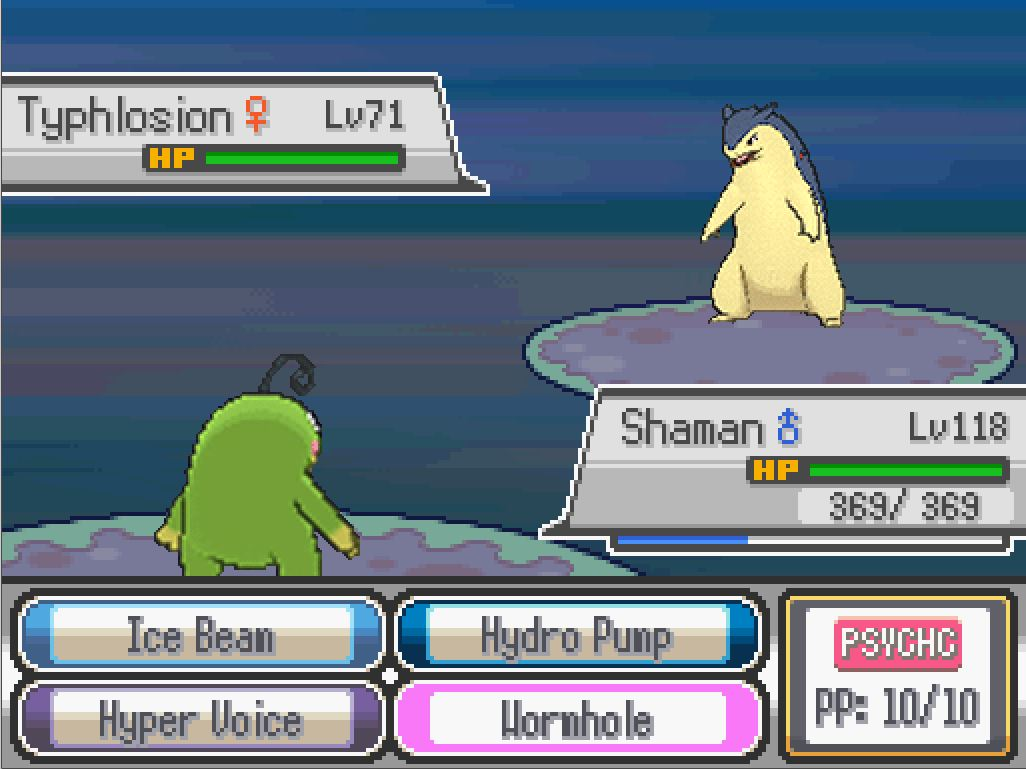
Each move applies a different amount of damage, and so we need a
method that can determine how much damage to apply to the
opponent. Write a method that takes in the name of the attack
move as an input and outputs the length of the move name plus
10 as the amount of damage the move will deal.
- In the Lego games, it is common for your character to need to interact with and build various items or structures.

You can imagine that building an item is one method, where in that
method it would call other methods like one for tracking the progress
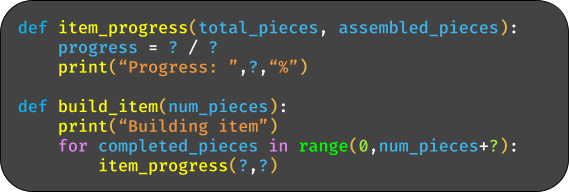
of an item ’s construction. Write a method called item_progress that
outputs how much of an item has been constructed as a
percentage, taking in the total number of pieces and the number of
pieces already assembled together as inputs. Afterwards, write a
method that assembles one piece of an item every second, wherein
the total number of pieces you provide as an input, and then calls
item_progress to give an update on the construction. Below is a
template for how you can do this.

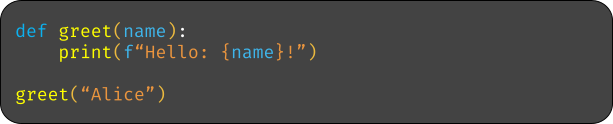
- Define a function ‘greet’ that takes a single parameter ‘name’ and prints a greeting message using that name.
- Example: ‘greet(“Alice”)’ should print ‘Hello, Alice!’
- Define a function ‘add’ that takes two parameters ‘a’ and ‘b’ and returns their sum.
- Example: ‘add(3,5)’ should return ‘8’
- Define a function ‘introduce’ that takes three parameters: ‘name’, ‘age’, and ‘city’ and prints a sentence introducing the person.
- Example: ‘introduce(“Bob”,25,“New York City”)’ should return ‘My name is Bob, I am 25 Years old, and I live in New York City’

- Define a function ‘rectangle_area’ that takes two parameters ‘length’ and ‘width’ and returns the area of the rectangle.
- Example: ‘rectangle_area(4,5)’ should return ‘20’
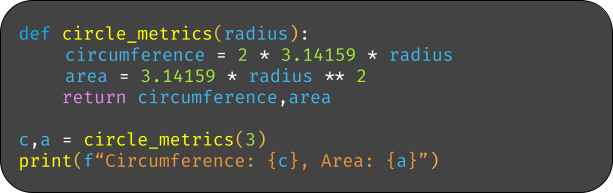
- Define a function ‘circle_metrics’ that takes one parameter ‘radius’ and returns the circumference and area of the circle.
- Example: ‘circle_metrics(3)’ should return ‘(18.84,28.26)’
- Define a function ‘convert_temperature’ that takes a temperature in Celsius and returns it in Celsius and Fahrenheit.
- Example: ‘convert_temperature(0)’should return ‘(0,32)’
- Define a function ‘is_even’ that takes one parameter ‘number’ and returns ‘True’ if the number is even and ‘False’ otherwise.
- Example: ‘is_even(4)’ should return ‘True’

- Define a function ‘factorial’ that takes one parameter ‘n’ and returns the factorial of that number (which is the operation of multiplying together every positive number less than the number n).
- Example: ‘factorial(5)’ should return ‘120’
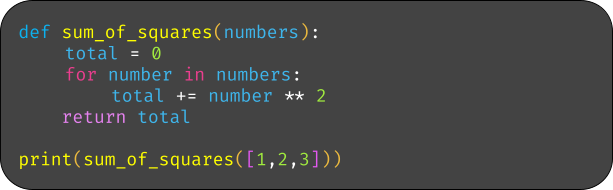
- Define a function ‘sum_of_squares’ that takes a list of numbers and returns the sum of their squares.
- Example: ‘sum_of_squares([1,2,3])’ should return ‘14’
- Define a function ‘count_vowels’ that takes a string and returns the number of vowels in it.
- Example: ‘count_vowels(“hello world”)’ should return ‘3’
- Define a function ‘doHomework’ that prints “Doing homework”.
- Example: ‘doHomework()’ should print ‘Doing homework’

- Define a function ‘bake_cake’ that prints “Baking a cake” and call it twice.
- Example: ‘bake_cake()’ should print ‘Baking a cake’
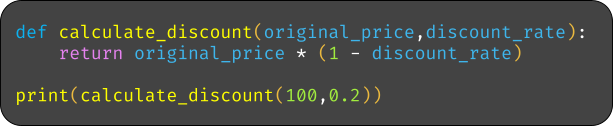
- Define a function ‘calculate_discount’ that takes parameters ‘original_price’ and ‘discount_rate’ and returns the discounted price.
- Example: ‘calculate_discount(100,0.2)’ should return ‘80’
- Define a function ‘create_username’ that takes parameters ‘first_name’ and ‘last_name’ and returns a username in the format ‘first_name.last_name’.
- Example: ‘create_username(“john”,“doe”)’ should return ‘john.doe’
- Define a function ‘schedule_meeting’ that takes parameters ‘day’,‘time’, and ‘location’ and prints a meeting schedule.
- Example: ‘schedule_meeting(“Monday”,“10:00 AM”,“Conference Room”)’ should print ‘Meeting scheduled on MOnday at 10:00 AM in Conference Room’

OR

- Define a function ‘trip_cost’ that takes one parameters ‘distance’,‘fuel_efficiency’, and ‘fuel_cost’ and returns the cost of travel.
- Example: ‘trip_cost(100,25,3)’ should return ‘12’
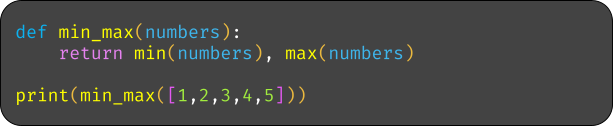
- Define a function ‘min_max’ that takes a list of numbers and returns the minimum and maximum values.
- Example: ‘min_max([1,2,3,4,5])’ should return ‘(1,5)’
- Define a function ‘rectangle_properties’ that takes parameters ‘length’ and ‘width’ and returns the perimeter and area of the rectangle.
- Example: ‘rectangle_properties(4,5)’ should return ‘(20,18)’
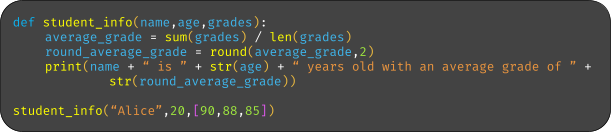
- Define a function ‘student_info’ that takes parameters ‘name’, ‘age’, and ‘grades’ (a list) and prints the student’s name, age, and average grade.
- Example: ‘student_info(“Alice”,20,[90,85,88])’ should print ‘Alice is 20 years old with an average grade of 87.67’
OR

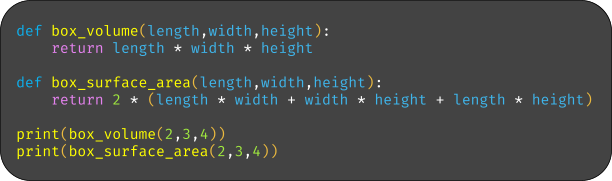
- Define a function ‘box_volume’ that takes parameters ‘length’, ‘width’, and ‘height’ and returns the volume of the box. Also, define a function ‘box_surface_area’ that takes in the same parameters as box_volume but returns the surface area of the box.
- Example: ‘box_volume(2,3,4)’ should return ‘24’
- Example: ‘box_surface_area(2,3,4)’ should return ‘52’

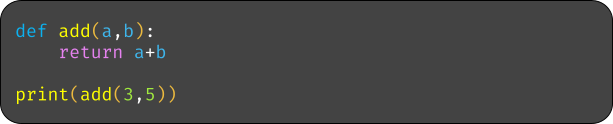
2. Define a function ‘add’ that takes two parameters ‘a’ and ‘b’ and returns their sum.
- Example: ‘add(3,5)’ should return ‘8’
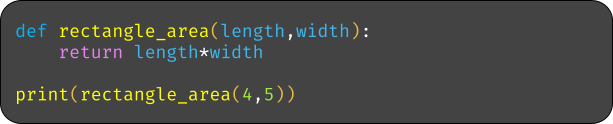
4. Define a function ‘rectangle_area’ that takes two parameters ‘length’ and ‘width’ and returns the area of the rectangle.
- Example: ‘rectangle_area(4,5)’ should return ‘20’
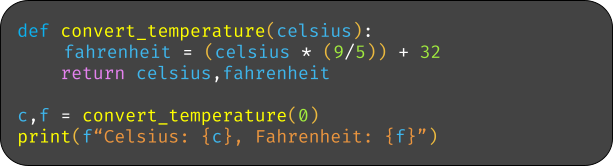
6. Define a function ‘convert_temperature’ that in a temperature in Celsius and returns it in Celsius and Fahrenheit‘.
- Example: ‘convert_temperature(0)’ should return ‘(0,32)’
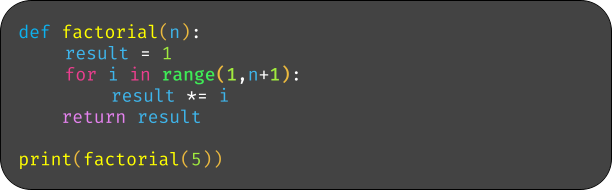
8. Define a function ‘factorial’ that takes the parameter ‘n’ and returns the factorial of that number (which involves the operation of multiplying together every positive before the number n.
- Example: ‘factorial(5)’ should return ‘120’
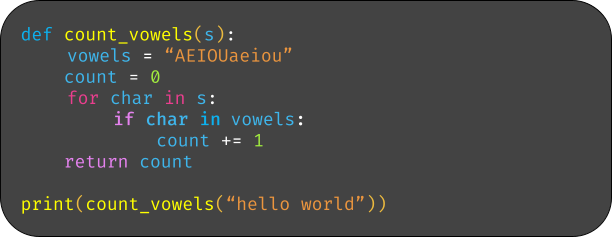
10. Define a function ‘count_vowels’ that takes a string and returns the number of vowels.
- Example: ‘count_vowels(“hello world”)’ should return ‘3’
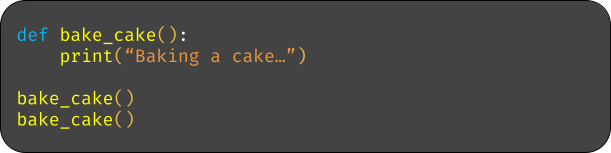
12. Define a function ‘bake_cake’ that prints “Baking a cake”.
- Example: ‘bake_cake()’ should print ‘Baking a cake’
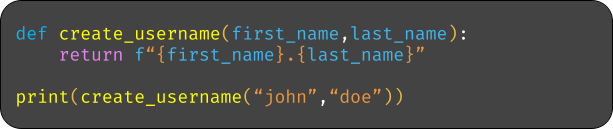
14. Define a function ‘create_username’ that takes two parameters ‘first_name’ and ‘last_name’ and returns a username in the format ‘first_name.last_name’.
- Example: ‘create_username(“john”,“doe”)’ should return ‘john.doe’
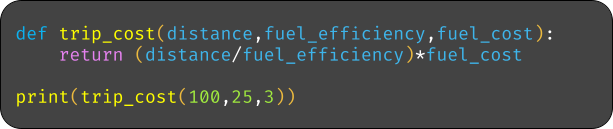
16. Define a function ‘trip_cost’ that takes parameters ‘distance’, ‘fuel_efficiency’, and ‘fuel_cost’ and returns the travel cost.
- Example: ‘trip_cost(100,25,3)’ should return ‘12’
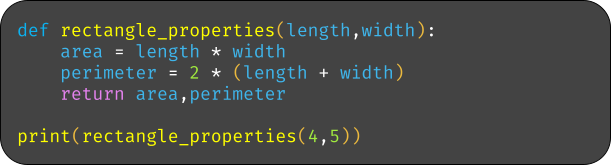
18. Define a function ‘rectangle_properties’ that takes parameters ‘length’ and ‘width’ and returns the perimeter and area of the rectangle.
- Example: ‘rectangle_properties(4,5)’ should return ‘(20,18)’
20. Define a function ‘box_volume’ that takes parameters ‘length’, ‘width’, and ‘height’ and returns the volume of the box. Also, define a function ‘box_surface_area’ that takes in the same parameters as box_volume but returns the surface area of the box.
- Example: ‘box_volume(2,3,4)’ should return ‘24’
- Example: ‘box_surface_area(2,3,4)’ should return ‘52’